About

Optimize Fabrication Workflows with DXNest

DXNest is dedicated to transforming fabrication processes through automation. Our mission is to enhance efficiency by reducing prep time, cutting waste, and automating labor-intensive tasks. We are committed to innovation, precision, and supporting manufacturers in achieving faster, more accurate production cycles.

Automated BOM Creation

Generate accurate bills of materials instantly, simplifying inventory management and procurement processes.


Comprehensive CNC Programming

Seamlessly convert designs into precise CNC instructions to accelerate cutting and fabrication cycles.


Advanced Nesting Algorithms

Optimize material usage with intelligent nesting that maximizes sheet layouts and minimizes scrap.


Integrated Reporting Tools

Monitor production with detailed reports that enhance decision-making and operational transparency.


DXNest Interface Preview

Below are a few examples of how DXNest presents project data, panel lists, and nesting layouts.

main windows

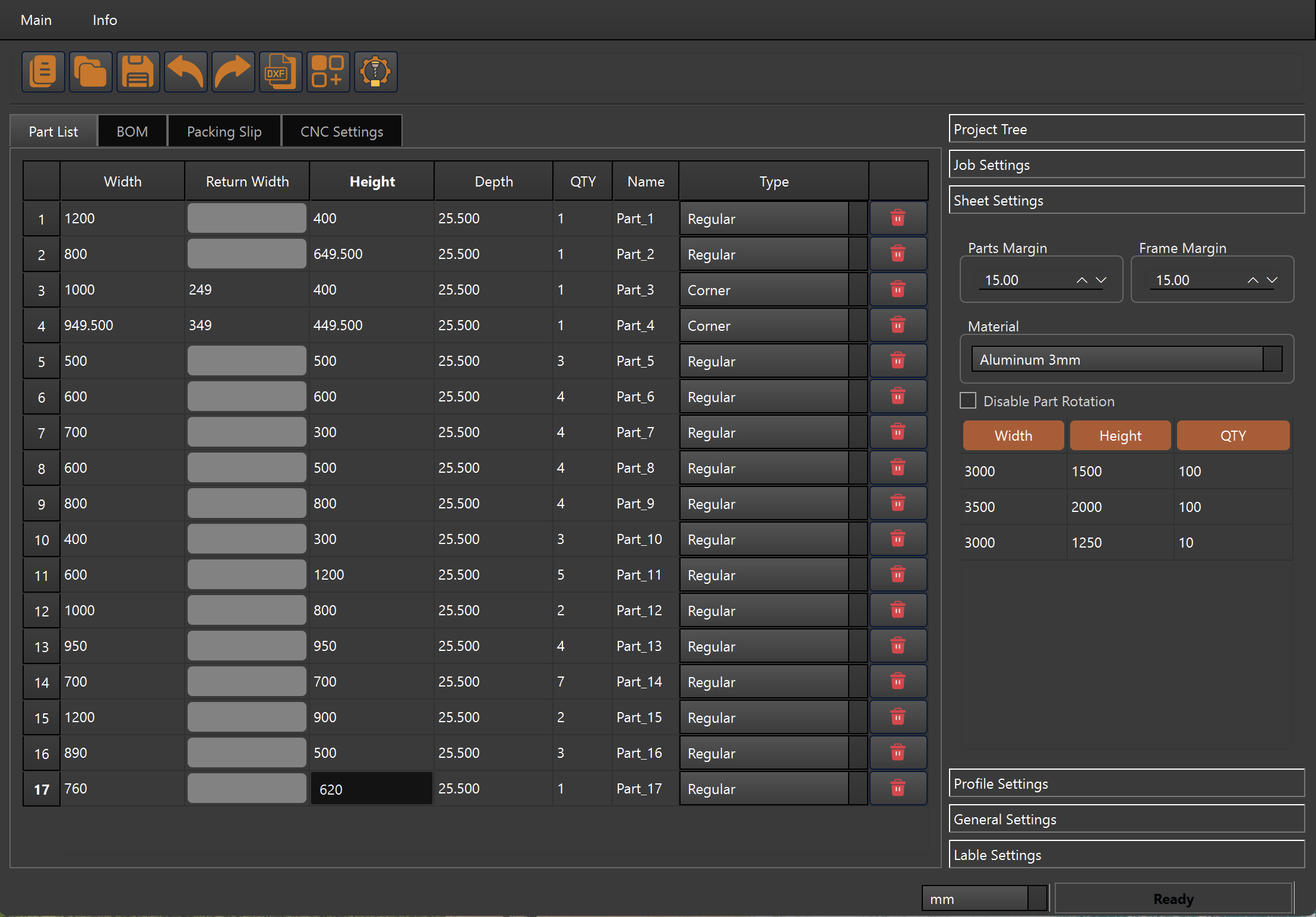
Panel list view where panel dimensions, quantities, and types are defined before nesting.
bill of materials

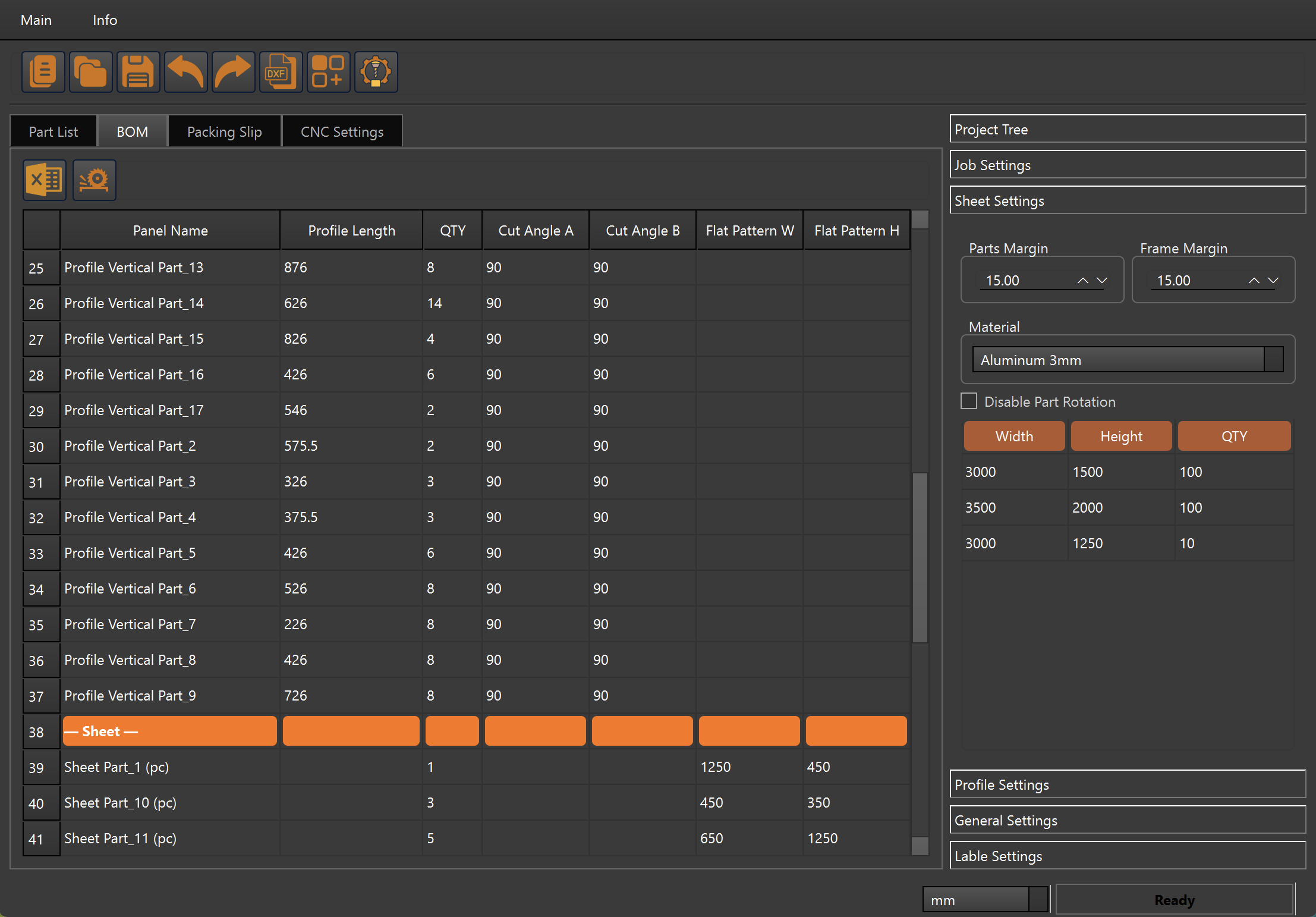
BOM and sheet settings view combining project tree, sheet formats, and material configuration.
report

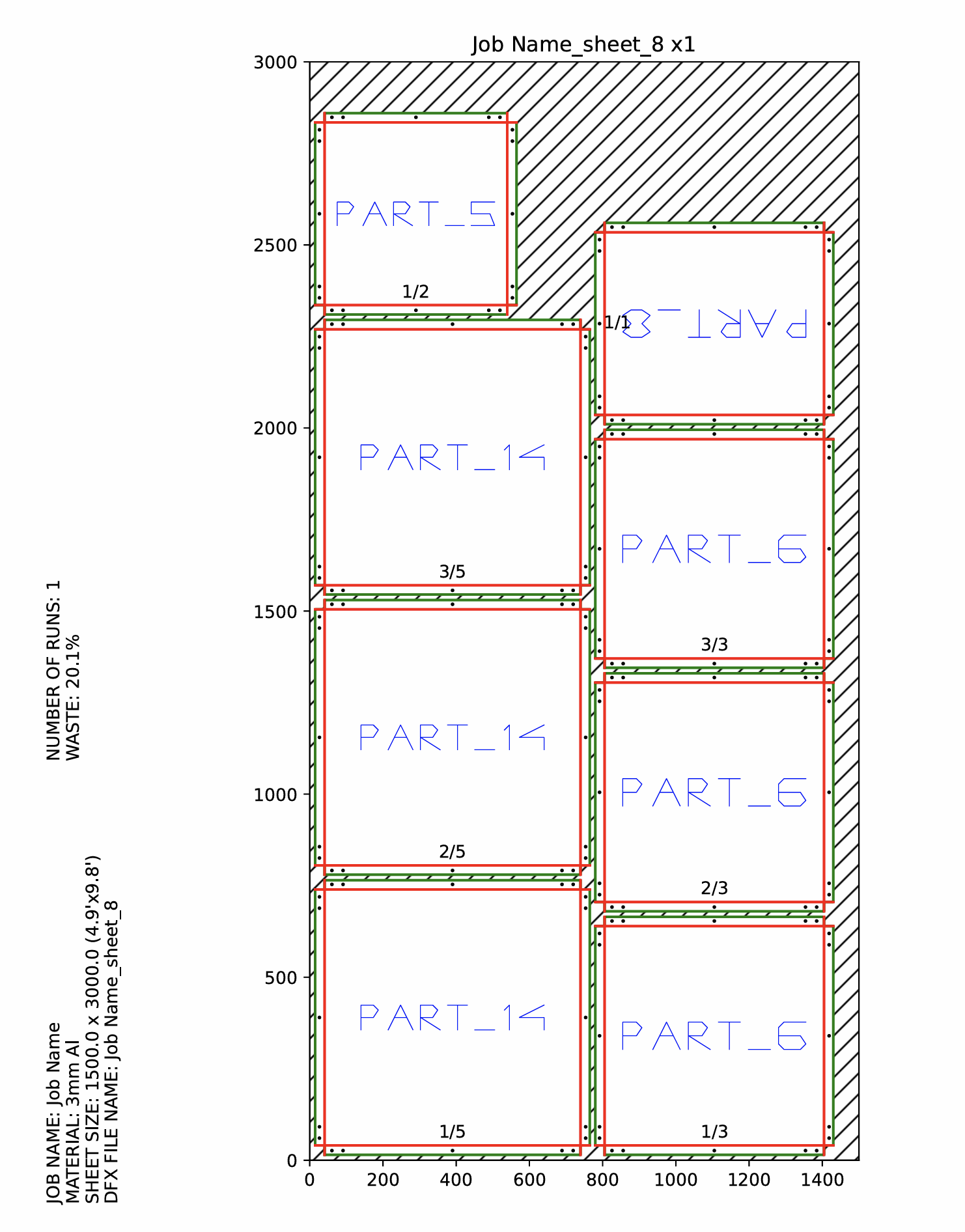
Example of a DXNest nesting layout showing multiple panel types placed on one sheet with highlighted waste area.

What DXNest PanelBuilder Can Do

DXNest is an integrated CAD/CAM solution for façade and sheet-metal fabrication. It connects project data, panel geometry, sheet formats, nesting, CNC programming, and documentation into a single workflow, so engineers don’t have to jump between multiple tools.

Project & Data Management

  • Separate project files. Create a dedicated project for each job and save it as an individual file, keeping all panels, sheets, CNC settings, and reports in one place.
  • Flexible project parameters. Configure global settings for each job: material type and thickness, margins, label format, units, and other rules that will be applied across nesting, CNC, and reporting.
  • Panel list for each project. Build a complete list of panels with width, height, depth, quantity, and type, forming the central database for further processing.
  • Selective processing of panels. Choose which panels from the list should be processed in a particular nesting run, while keeping the full project data intact.
  • Sheet formats and margins. Define multiple sheet sizes and available quantities, and set margins between panels and from panels to the sheet frame to match real cutting and clamping conditions.
  • Profile lists and lengths. Maintain a database of profiles and their lengths for supporting structures, enabling accurate material calculations and profile cutting optimization.

Smart Input from CAD & Custom Parts

  • Reading panel sizes from DXF. Import DXF drawings and let DXNest automatically detect closed contours and extract panel dimensions, reducing manual data entry and errors.
  • Custom parts for nesting. Add additional parts with user-defined dimensions that should be included in nesting, such as test pieces or non-standard components.

Nesting & CNC Automation

  • Multi-format nesting. Nest panels across several sheet formats at the same time, taking into account available quantities to minimize material waste.
  • Selectable sheet materials. Assign parts to specific materials (for example, different aluminum or steel grades and thicknesses) to ensure they are nested on the correct sheets.
  • Engraving part names. Optionally engrave the part name or code on each panel directly on the sheet to simplify identification on the shop floor.
  • Advanced CNC settings. Configure tool numbers, cutting order, lead-in/lead-out parameters, engraving options, feed rates, and safety positions so that generated CNC programs are ready for your machines.
  • CNC programs for part processing. Automatically generate CNC code for cutting and engraving based on nesting layouts, with paths prepared to match your controller format.
  • Fast processing of large projects. DXNest is optimized to handle large façades with hundreds or thousands of panels, calculating complete nesting and CNC output within minutes.

Documentation & Outputs

  • Customizable Packing Slip template. Adjust the packing slip layout to match your documentation standards: company logo, project data, panel identifiers, quantities, and grouping by crates or pallets.
  • Automatic BOM generation. Create detailed Bills of Materials for panels, profiles, and additional components with their dimensions and quantities, ready for purchasing and stock control.
  • DXF files for each part. Generate separate DXF files for individual panels or parts, useful for archiving or integration with other CAD/CAM systems.
  • Nesting layouts and DXF for each sheet. For every sheet, DXNest produces a visual nesting layout and a corresponding DXF file that can be used directly for CNC programming or quality checks.
  • Label generation. Print labels with part names, IDs, sizes, quantities, and other metadata to simplify logistics and installation.
  • Metric and imperial units. Work in millimetres or inches depending on project requirements; all calculations, nesting, CNC programs, and reports follow the selected units.